How I Broke My Scrolling Habit Without Deleting a Single App
Medium | 15.01.2026 01:50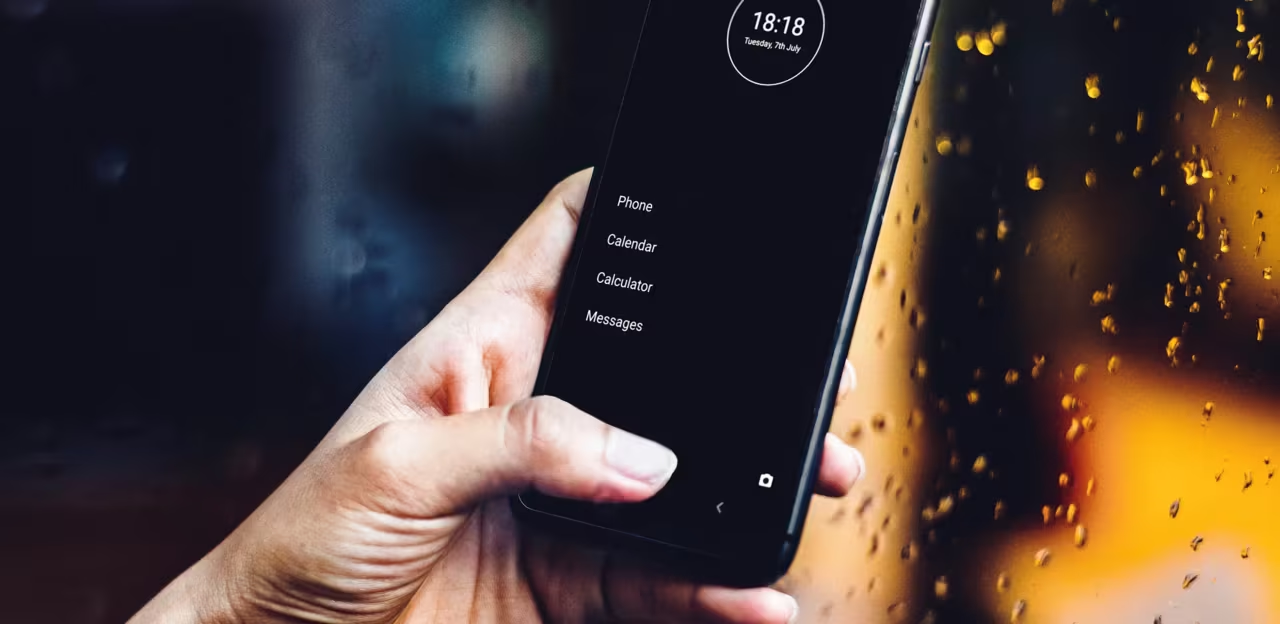
How I Broke My Scrolling Habit Without Deleting a Single App
How a minimalist interface quietly reduced my screen time and improved my focus
5 min read
·
1 hour ago
--
Listen
Share
It’s 10 p.m., and I’m tucked into bed, phone in hand, doom-scrolling through TikTok reels that I swear I’ll “just watch one more of.” Two hours later, I’m wide awake, eyes burning, wondering where the evening went.
After this, I’ve decided to tackle my scrolling habits differently this time. Not too long ago, my approach was to archive or delete the most addictive apps entirely. It worked for a while, but it was often inconvenient — inevitably, something would come up that required me to check that app, and I’d end up reinstalling it, only to fall back into the same patterns.
That’s when I stumbled upon minimalist phone, an app designed specifically to curb smartphone overuse without forcing you to go cold turkey. With over 8 million downloads on Android and now available on iOS, it’s gained traction for good reason. I gave it a shot during its 7-day free trial, and it genuinely shifted how I use my phone. My screen time dropped significantly, and I felt more in control.
The Scale of the Problem
Smartphone use has become pervasive. There are an estimated 6.8 billion smartphone users worldwide in 2025, representing around two-thirds of the global population. Average daily screen time has risen alongside this growth, approaching 4.8 hours per day globally, with younger generations often exceeding that significantly. Users check their phones nearly 100 times per day.
This level of engagement is more than habitual. For many, it resembles patterns associated with digital dependency and behavioral addiction. In some analyses, over 48 percent of the world’s population is considered to exhibit addiction-like smartphone use.
Excessive screen time correlates with impacts on attention, productivity, and mental health, particularly among younger users and adolescents, where high usage is linked to anxiety, depression, and other well-being concerns.
With this context, it became clear why conventional tactics like deleting apps rarely produce sustained change: the problem is woven into the very interface and incentives of modern smartphones.
How Did The Minimalist Phone App Help My Scrolling Addiction
What makes the minimalist phone different from previous approaches I tried is its fundamental redesign of the interface and interaction flow. Instead of the standard grid of icons and visually stimulating apps that tempt endless scrolling, the app transforms your phone into an intentionally sparse environment.
Here’s what it offers and how it works:
- The Text-Only App List and Hiding Distractors
Instead of a grid of tempting icons, you get a clean alphabetical list. I hid social media apps like Instagram and Twitter right away. Out of sight, out of mind. Want to block them entirely? Set a schedule for up to 30 days. During my work hours, I also blocked email and news apps. This helped me dive into writing sessions without the constant ping-pong of notifications. And I am not the only one; 93% of users report less screen time after just three days. - Mindful Launch Delay and Time Reminders
Before an app opens, there’s a 15-second delay — enough time to ask, “Do I really need this right now?” Paired with in-app reminders that pop up after a set time (I chose 20 minutes on any non-essential app), it adds just the right friction. During my trial, these pauses turned impulsive opens into deliberate choices. Research shows that building intentional barriers like these reduces habitual phone use, as shown in a 14-day study where minimalist phone users saw significant drops in overall screen time and compulsive behaviors. - Custom Folders, Renaming, and Homescreen Shortcuts
I organized my essentials (calendar, notes, a meditation app) into focused folders and renamed temptations, such as “Brain Number” for TikTok. Then, I pinned shortcuts to my homescreen for quick access to what matters. No more digging through clutter. This setup freed up headspace for creativity. I actually finished reading a book in days rather than weeks. - Smart Notification Filters and Monochrome Mode
I filtered notifications to essentials only. Add the black-and-white theme to that, and scrolling became boring. Suddenly, taking a walk or calling a friend sounded way more appealing. Studies support that reducing screen time boosts focus, lowers stress, and even improves sleep quality by curbing late-night habits.
These design decisions created the space to break automatic scrolling patterns. The result was a measurable reduction in screen time. I went from 4+ hours per day to 1–2 hours.
The Real Wins
It’s one thing to log fewer hours. It’s another to feel the shift. For me, those reclaimed minutes turned into nature hikes, deeper conversations with my partner, longer meditations, and, finally, writing a story I’d ignored for months. Focus, productivity, and my ability to delay gratification improved more than I thought possible.
Cutting screen time isn’t just feel-good fluff. It’s linked to tangible boosts in mental health. One study found that even modest reductions improve sleep, reduce eye strain, and enhance emotional well-being. It also helps ease depression by fostering real-world connections and amplifying physical activity, which, in turn, sharpens focus and brain function.
The time it takes to feel the benefits differs for everyone. In my case, by week’s end, I felt lighter, more present—no more guilt-scrolling, just quiet confidence and control.
Your Turn: A Simple Step Toward a Calmer Digital Life
If you’re nodding along, thinking, “This could be me,” here’s the good news: The minimalist phone app makes it effortless to start. Grab the 7-day free trial on Android or iOS at minimalistphone.com, tweak a couple of settings, and watch the transformation. It’s not about going cold turkey. It’s about designing a phone that works for you, not against you.
I’ve kept it as my daily driver since my test run, and honestly? It’s one of the best “upgrades” I’ve made to my routine. Less screen time doesn’t mean being less up to date. It means being up to date with what matters to you.
This piece is part of a paid collaboration with minimalist phone. I tested the app independently, and the views expressed reflect my genuine experience.